· 12 min read
Claude Agent SDK Example: Building an AI Gym Coach (OAK)
Table of Contents
I’ve tracked my workouts in a lot of places: a notes app, two or three fitness apps I paid for and stopped opening, and a paper notebook. They all fell off for the same reason: friction. Logging a set turns into a five-screen form, your training history lives in a database you don’t control, and the moment you skip a week there’s nothing to pull you back.
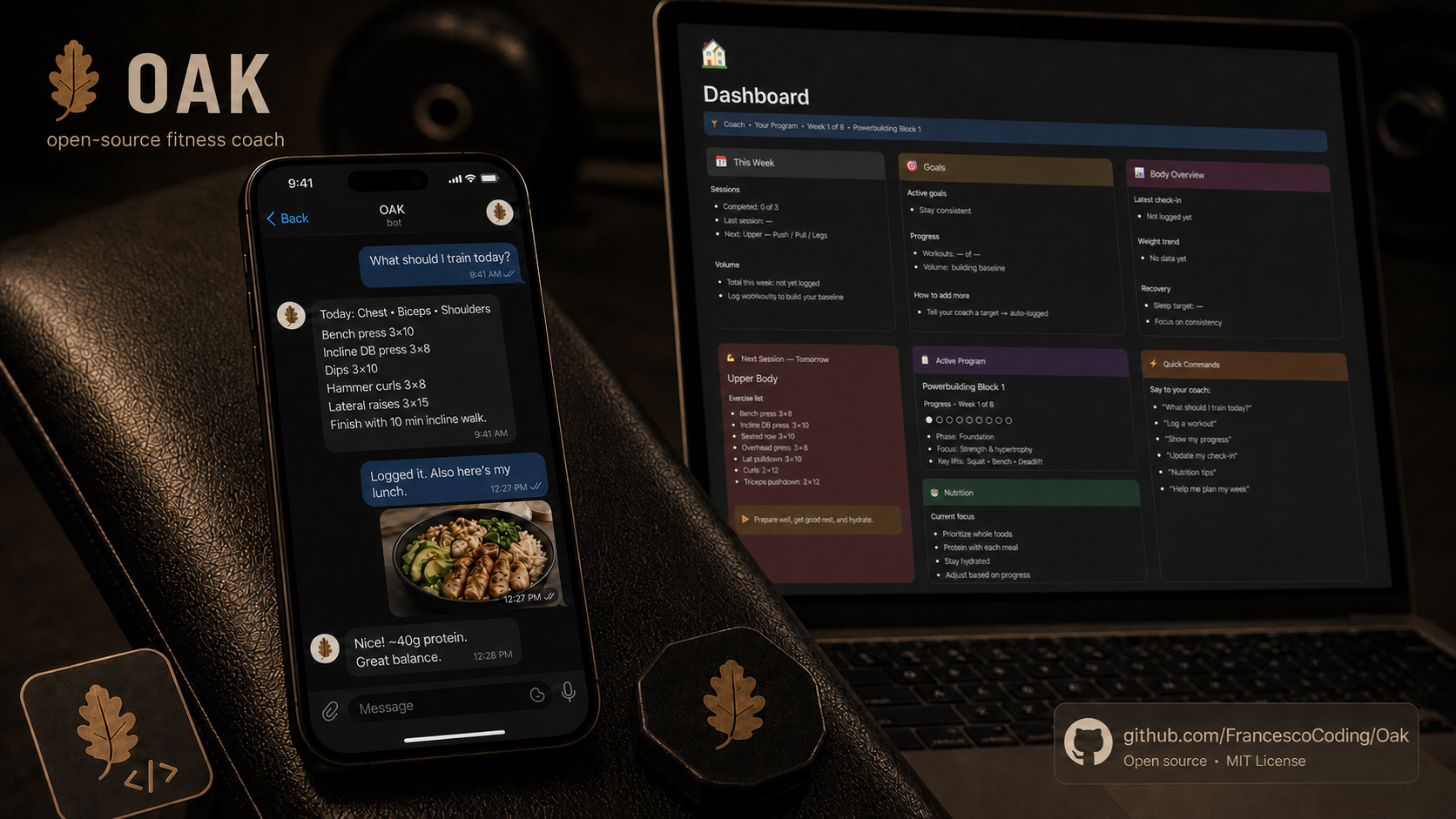
So instead of downloading yet another app, I built the thing I actually wanted: a coach that lives in a chat app instead of behind its own icon, remembers everything so I don’t have to, and grounds every bit of advice in what I really lifted last week. It’s called OAK, it’s open source on GitHub, and it turned out to be a great excuse to build a real agent.
In this article, I’ll walk you through:
- Why the Claude Agent SDK (and the billing trick that made this free to run)
- What OAK actually does day to day
- The technical decisions behind it
- How I test an agent whose main feature is a personality
Let’s dive in!
Why the Claude Agent SDK?
OAK is not my first agent. I have already built a couple that I lean on daily: one at work that runs PM operations across Jira, Confluence, Slack and Teams, and another I use as a DevOps agent for Anonfeedback, managing Cloudflare, MongoDB, Netlify and GCP from one place.
So when I started experimenting with the Claude Agent SDK, essentially Claude Code packaged as a library, I wanted a project with real stakes rather than another toy to-do app. A coach is a genuinely good fit for an agent: it has to hold context across a conversation, call tools, read images, and make judgement calls. The SDK gives you the machinery you’d otherwise hand-write: the agent loop, session resume, a built-in tool set you can extend or lock down, and a permission system. Because OAK is single-owner, I run it with a curated tool whitelist rather than interactive permission prompts. That left me free to focus on what makes a coach actually good rather than on plumbing.
But here’s the detail that turned it from a neat experiment into something I use daily: the Agent SDK can run on your existing Claude subscription token instead of a metered API key. I’m already paying for that subscription. So OAK costs me nothing extra to run. No per-token math, no billing dashboard creeping up every time I ask what to train.
That single decision reshaped the whole project, because “free to run forever” is what makes a daily-use tool worth building in the first place.
Meet OAK
The name is a nod to the “Austrian Oak”, Arnold Schwarzenegger’s old bodybuilding nickname, which felt about right for a coach obsessed with showing up and putting in the work. A few decisions shaped everything that followed.
It lives in Telegram
Telegram wasn’t about where I spend my time; it won because its bot API is the fastest way to get a real chat interface running, no app to build, no frontend to ship. As a bonus, there’s no new app to install and no extra icon to ignore. I just open a chat and talk to it:
“What should I train today?”
“Did 5x5 squats at 80kg, felt strong.”
That second message logs the set. That’s it, that’s the whole logging flow. I can fire off a voice note between sets and it transcribes locally (and free) with Whisper, then treats it exactly like text. Send it a photo of a meal, a food label, or some gym machine you’ve never seen before, and it genuinely looks and responds. It also writes to the Google Calendar API, so sessions land on your actual schedule with native phone reminders instead of living only inside the chat.
Notion is its memory
This was the part I cared about most, because the reason my tracking always collapsed was that the data lived nowhere durable. OAK builds and maintains its own Notion workspace: programs, goals, body stats, a workout log, and a live dashboard that always reflects your current week and next session.
Your history isn’t trapped in some vendor’s database. It’s in your Notion, in plain editable pages. You can also drop existing programs, a coach’s spreadsheet, or reference PDFs into a folder and ask OAK to import them; it files each into a tidy knowledge base page it then reads from when planning your week.
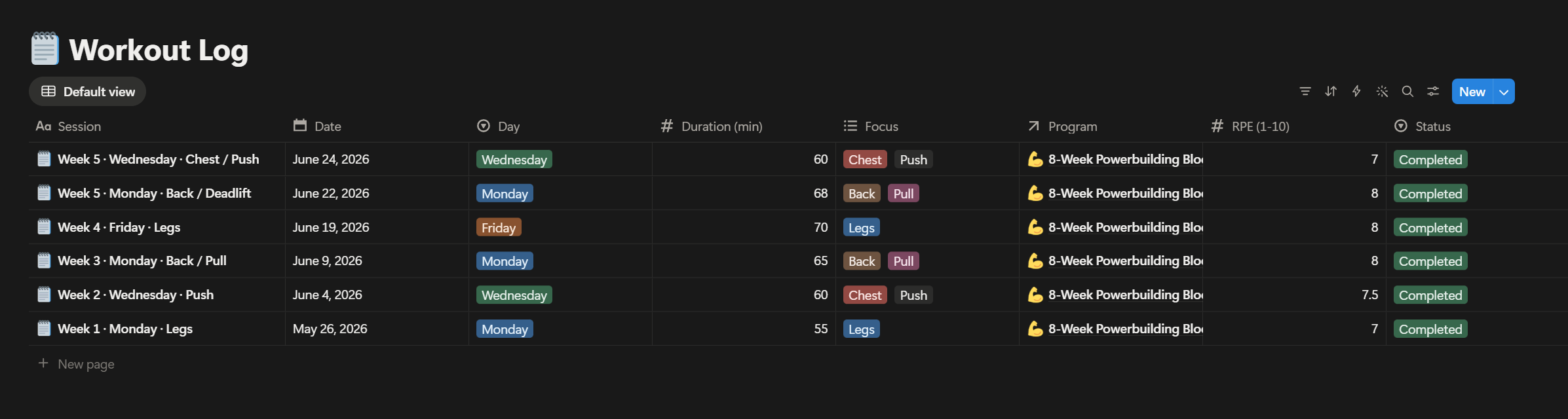

This is the distinction that matters when you build an agent: the SDK manages the in-session context, but that context evaporates when the conversation ends. Notion is the durable memory layer that survives across sessions, so “what did I lift last week” is a lookup against ground truth rather than something the model has to have kept in its context window. It’s close to what Andrej Karpathy has called an “LLM wiki”: a human-readable, editable knowledge base the model curates and reads back from, rather than an opaque embedding store you can’t inspect. Notion is the brain, the bot is the mouth.
It coaches with opinions
A coach that praises everything is useless. OAK is built on the fundamentals that actually move the needle: progressive overload, recovery, and consistency over heroics. It will push back when your plan doesn’t add up, and it stays sensible about nutrition, deferring to a real professional for anything medical.
It also ships with a configurable persona. Living up to the name, by default it can coach you in a certain unmistakable Austrian accent, and you can switch that off whenever you want it to just be straight with you.
The Technical Decisions
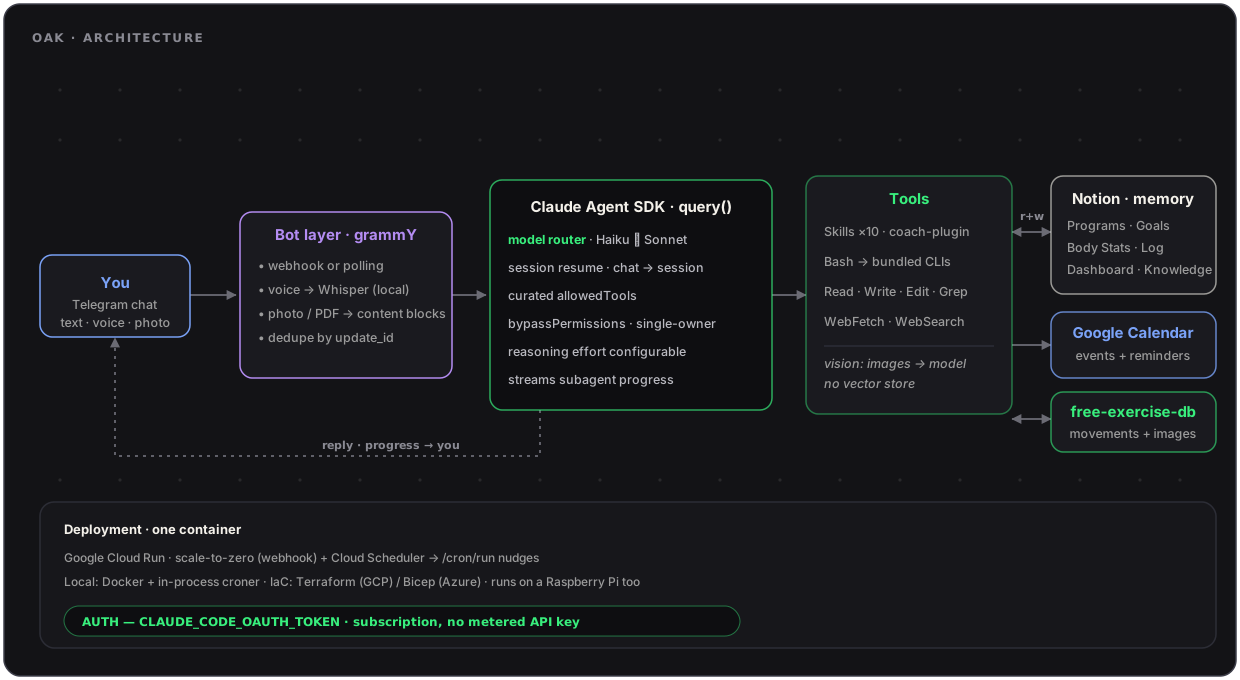
A few choices under the hood are doing most of the heavy lifting. Here’s the whole thing on one page, then let’s go through them.
No Database, on Purpose
OAK has no Postgres, no Redis, no vector store. State lives in Notion plus a small gitignored data/ folder for local bookkeeping.
Sounds like a hack? Maybe, but look at what it buys you:
- The “database” comes with a great UI for free
- The user owns their data outright
- There’s one less service to deploy, back up, and pay for
Before advising, the agent queries the relevant Notion databases directly (Programs, Goals, Body Stats, Workout Log) and reads the knowledge-base pages in full, so every recommendation is grounded in your actual training history rather than whatever the model half-remembers from the chat. It’s retrieval-grounding without the embeddings: structured lookups against a source of truth rather than RAG Retrieval-Augmented Generation: embedding documents and pulling the nearest matches by vector similarity over a vector index. That’s what keeps the coaching honest instead of plausible-sounding.
Personality and Person Are Separate Files
The coaching persona lives in CLAUDE.md, the SDK’s convention for agent instructions (effectively the system prompt), checked into the repo. Everything about you (goals, stats, preferences) lives in PERSONAL.md, which is gitignored.
That one split is what makes the repo forkable: the code stays generic while every deployment is personal, and nobody accidentally commits their bodyweight to GitHub.
Abilities Are Packaged as Skills
The agent’s abilities are packaged as ten Skills in a coach-plugin/ folder. Each is a self-contained folder of instructions the model pulls in only when a task actually calls for it (progressive disclosure), rather than one giant prompt carrying every capability at once. A few of them:
- Logging a workout and recommending the next one
- Exercise lookup (from the public domain free-exercise-db, so it pulls real movements with demo images instead of inventing them)
- Weekly planning and progress reports
- Notion setup, knowledge import, and calendar sync
Reading a meal photo or a food label isn’t a skill of its own; vision is a cross-cutting capability (images and PDFs become model content blocks) that the nutrition and logging skills lean on when an image arrives. Want to add an integration, say a fitness tracker? You add a skill, you don’t thread logic through a router, and you don’t bloat the base context to do it. The bot layer itself is deliberately thin: grammY handles Telegram, hands the message to the Agent SDK runner, and gets out of the way.
Voice Is Local by Default
Voice notes are transcribed on-device with Whisper (whisper-base by default, swappable via an env var) run through Transformers.js: about a 150 MB one-time model download and roughly 1 GB of RAM. If you’d rather trade privacy and a few pennies for lighter hardware, a single env var (TRANSCRIBE_PROVIDER=api) swaps in a hosted endpoint instead.
Subscription Auth Instead of an API Key
OAK authenticates with an OAuth token from claude setup-token on a paid Claude plan (the same credential Claude Code itself uses), validated at startup. There’s no metered per-token billing anywhere in the system, which is exactly what you want for a bot you’ll talk to twenty times a day.
Because the budget is a subscription rather than a meter, the thing worth optimising shifts from dollars to speed and plan limits. So a lightweight classifier routes throwaway turns, logging a set, to a faster Haiku model and keeps the heavier reasoning on Sonnet, and it only switches on brand-new sessions so it never swaps models mid-conversation.
📢 This approach is ideal for self-hosting for yourself. It is not designed for handing the bot out to a hundred strangers; that’s a different and pricier auth story. 📢
Deployment Scales to Zero
It all runs as a single container. I developed it locally with Docker (in-process scheduler for the reminders), but the version that actually coaches me lives on Google Cloud Run, scaling to zero between messages, with Cloud Scheduler firing the morning nudges. A personal bot is idle almost all the time, so my bill works out to pennies a month. I genuinely spend more on the coffee I drink while checking the dashboard than on running the coach.
You’re not locked into my choice though: the repo ships Terraform for GCP and Bicep for Azure Container Apps, and plain local hosting works fine too (a Raspberry Pi in a cupboard will happily do the job).
One operational constraint worth flagging: a Telegram bot token can only be long-polled by one process at a time, so two pollers on the same token means Telegram returns 409s until one backs off. I hit that with my laptop and a deployed copy both live on the same token. The Cloud Run deployment sidesteps it by running in webhook mode instead of long-polling (and deduping redelivered updates by update_id); the rule of thumb for local dev is just to use a separate bot token.
Testing a Personality
Here’s a fun problem: “it will push back when your plan doesn’t add up” is a claim about behaviour, not code. How do you put that in CI?
OAK ships with an evals/ suite of behavioural checks: it runs the agent against real prompts and grades the answers for coaching tone, safety, and honesty:
- Does it stay grounded in the logged history?
- Does it defer to a professional on medical questions?
- Does it refuse to just flatter you?
Each reply is graded twice: deterministic style checks (no em dashes, no unprompted emoji, non-empty reply) and an LLM judge, a separate Claude call from a neutral working directory so it doesn’t inherit the persona, scoring the answer against that scenario’s rubric. The evals run against the actual subscription before a release, so persona changes get validated the same way code changes do. It’s a small suite, but it’s what tells me the coach still behaves after I’ve rewritten the prompt for the fifth time.
So… Does It Work?
It does, and the reason is that the friction is basically zero. Logging is a sentence rather than a form. Asking what to do today returns a real session built from what I lifted last week, not a generic template I’ll ignore by Thursday. The morning nudge means the gym stops silently dropping off my radar for a fortnight at a time.
It removed every excuse that wasn’t simply “I don’t feel like it today”. Turns out most of my excuses were logistical, not motivational.
It’s Open Source!
I built OAK for myself, but nothing in it is specific to me, so it’s on GitHub under the MIT license: github.com/FrancescoCoding/Oak. Fork it, swap the persona, reshape the Notion schema, point it at your own goals.
You bring your own keys: a Telegram bot token, your Claude subscription, and a Notion integration. It’s a few minutes of setup, all documented in the readme, and the source is organised by domain so it’s genuinely readable.
The Takeaway
What keeps striking me is how cheap this was to build now compared to even a year ago. The Agent SDK carries the plumbing, Notion is a free database with a great UI, Telegram is a free front end, and the model runs on a subscription I already had. The engineering that actually mattered was the parts the SDK doesn’t hand you: the durable memory model, the eval loop that keeps the persona honest, and the subscription-token auth that takes per-token billing off the table. The rest was deciding what a good coach should hold you accountable for.
If you’ve got a habit that keeps slipping and a suspicion that the real problem is friction rather than willpower, build the small tool that removes the friction. You’ll learn a genuinely useful stack on the way, and you might just start showing up.
Anyway, I have a lower body session today. OAK told me so.
🦉 Until next time!

Francesco Gruosso
Full-Stack Developer, BSc (Hons) Computer Science
Francesco is a software engineer with a passion for building performant and scalable web applications. He has experience working with a variety of technologies and languages, including JavaScript, TypeScript, React, and Node.js. In his free time, he enjoys writing technical articles and learning about new technologies.